Visualization in Bokeh
Making plots is quite irritating. I make plots far and few between so I always forget the nuances of setting certain types parameters. Bokeh is a Python package that makes use of Javascript and is far superior to Matplotlib. So I’m writing this document to keep track of how I made all of my plots from here on out.
Module Imports for Packages Used to Make Plots
>>> import numpy as np
>>> import pandas as pd
>>> import simuOpt
>>> simuOpt.setOptions(quiet=True, numThreads=4)
>>> import simuPOP as sim
>>> from saegus import analyze, parse, breed
Important Note
The only difference for working in the Jupter Notebook using Bokeh is
the import of output_notebook() from bokeh.io . Using output_notebook()
does not preclude you from exporting .svg file.
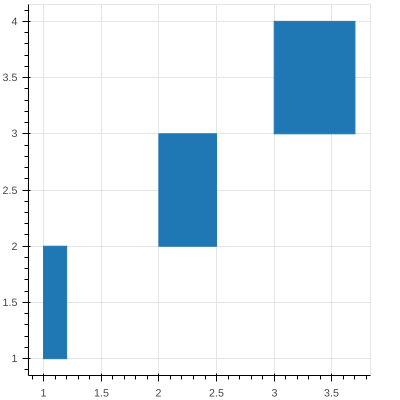
Simple Bokeh Quad Plot
>>> from bokeh.io import output_notebook, export_svgs, show
>>> from bokeh.plotting import figure
>>> p = figure(plot_width=400, plot_height=400, output_backend="svg")
>>> p.quad(top=[2, 3, 4], bottom=[1, 2, 3], left=[1, 2, 3],
      right=[1.2, 2.5, 3.7])
GlyphRenderer(id = '150ceca0-52d0-434c-becb-96bc8a19691f', …)
>>> show()
Chromosome Ideogram
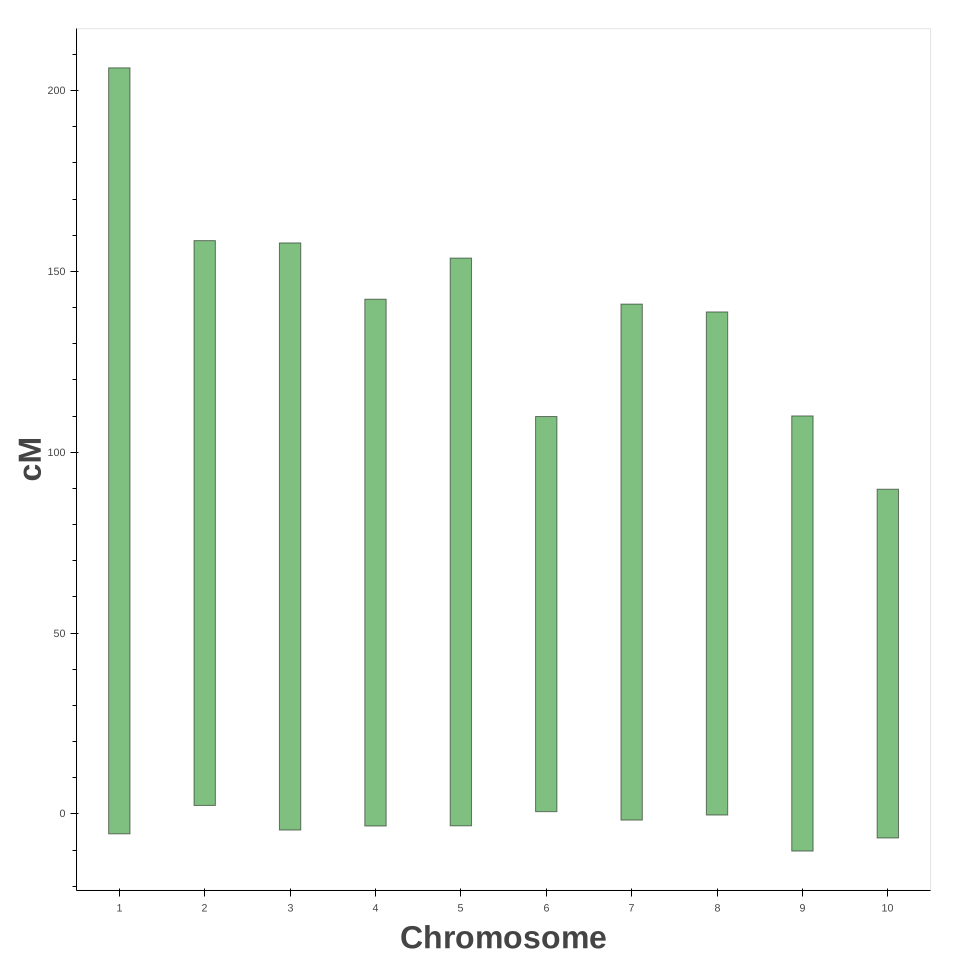
A figure which shows the relative lengths of the chromosomes in terms of centiMorgans. I think later on I will add a feature which will show the locations of QTL or something like that. Something to visually depict the distribution of loci and their effects.
>>> gen_map = pd.read_csv('example_genetic_map.txt', index_col=0, sep='\t')
>>> chromosome_bottoms = [min(gen_map.loc[gen_map['chr'] == i].cM) for i in range(1, 11)]
>>> chromosome_tops = [max(gen_map.loc[gen_map['chr'] == i].cM) for i in range(1, 11)]
>>> chromosome_factors = [str(i) for i in range(1, 11)]
>>> chrom_ideograms = figure(plot_width=960, plot_height=960, x_range=chromosome_factors,
...                        title="Chromosome Ideogram Figure",
...                        output_backend="svg")
>>> chrom_ideograms.xgrid.grid_line_color = None
>>> chrom_ideograms.ygrid.grid_line_color = None
>>> chrom_ideograms.vbar(x=chromosome_factors, top=chromosome_tops,
...                 bottom=chromosome_bottoms, width=0.25,
...                 line_width=1.0, line_color='black', fill_color='green',
...                 alpha=0.5)
GlyphRenderer(
id = '368a5815-446d-4154-8af9-bf8238d85e2b', ‹‹‹
data_source = ColumnDataSource(id='c675e345-087a-472f-a219-c59ad757982a', ...),
glyph = VBar(id='9eb8e5cb-6ca7-4aed-ad17-7b91a6660574', ...),
hover_glyph = None,
js_event_callbacks = {},
js_property_callbacks = {},
level = 'glyph',
muted = False,
muted_glyph = None,
name = None,
nonselection_glyph = VBar(id='a3aa9cd9-5216-4395-a242-db49895b6921', ...),
selection_glyph = None,
subscribed_events = [],
tags = [],
visible = True,
x_range_name = 'default',
y_range_name = 'default')
>>> chrom_ideograms.xaxis.axis_label="Chromosome"
>>> chrom_ideograms.xaxis.axis_label_text_font_size="24pt"
>>> chrom_ideograms.xaxis.axis_label_text_font_style="bold"
>>> chrom_ideograms.yaxis.axis_label="cM"
>>> chrom_ideograms.yaxis.axis_label_text_font_size="24pt"
>>> chrom_ideograms.yaxis.axis_label_text_font_style="bold"
>>> show(chrom_ideograms)
Distribution Plots
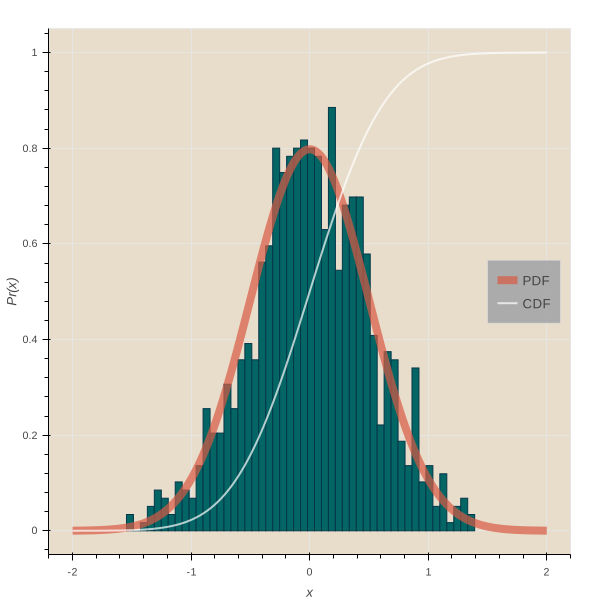
Example Normal Distribution Plot
This is the code to produce an example of a normal distribution in the example gallery. This same example also produces a
>>> p1 = figure(title="Normal Distribution (μ=0, σ=0.5)",tools="save",
...          background_fill_color="#E8DDCB", output_backend="svg")
>>> mu, sigma = 0, 0.5
>>> measured = np.random.normal(mu, sigma, 1000)
>>> hist, edges = np.histogram(measured, density=True, bins=50)
>>> x = np.linspace(-2, 2, 1000)
>>> pdf = 1/(sigma * np.sqrt(2*np.pi)) * np.exp(-(x-mu)**2 / (2*sigma**2))
>>> cdf = (1+scipy.special.erf((x-mu)/np.sqrt(2*sigma**2)))/2
>>> p1.quad(top=hist, bottom=0, left=edges[:-1], right=edges[1:],
...       fill_color="#036564", line_color="#033649")
>>> p1.line(x, pdf, line_color="#D95B43", line_width=8, alpha=0.7, legend="PDF")
>>> p1.line(x, cdf, line_color="white", line_width=2, alpha=0.7, legend="CDF")
>>> p1.legend.location = "center_right"
>>> p1.legend.background_fill_color = "darkgrey"
>>> p1.xaxis.axis_label = 'x'
>>> p1.yaxis.axis_label = 'Pr(x)'
Example Gridplot
A gridplot can produce a layout of plots. Its input is a tuple of
figure objects.
>>> p1 = figure(title="Normal Distribution (μ=0, σ=0.5)",tools="save",
...          background_fill_color="#E8DDCB")

>>> mu, sigma = 0, 0.5

>>> measured = np.random.normal(mu, sigma, 1000)
>>> hist, edges = np.histogram(measured, density=True, bins=50)

>>> x = np.linspace(-2, 2, 1000)
>>> pdf = 1/(sigma * np.sqrt(2*np.pi)) * np.exp(-(x-mu)**2 / (2*sigma**2))
>>> cdf = (1+scipy.special.erf((x-mu)/np.sqrt(2*sigma**2)))/2

>>> p1.quad(top=hist, bottom=0, left=edges[:-1], right=edges[1:],
...      fill_color="#036564", line_color="#033649")
>>> p1.line(x, pdf, line_color="#D95B43", line_width=8, alpha=0.7, legend="PDF")
>>> p1.line(x, cdf, line_color="white", line_width=2, alpha=0.7, legend="CDF")

>>> p1.legend.location = "center_right"
>>> p1.legend.background_fill_color = "darkgrey"
>>> p1.xaxis.axis_label = 'x'
>>> p1.yaxis.axis_label = 'Pr(x)'


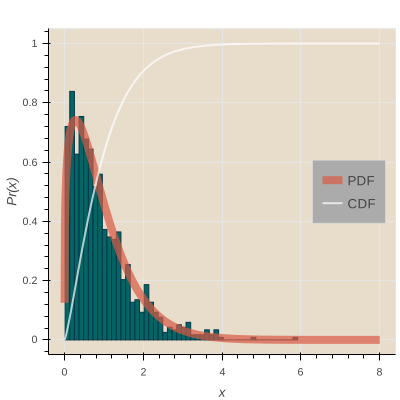
>>> p2 = figure(title="Log Normal Distribution (μ=0, σ=0.5)", tools="save",
...          background_fill_color="#E8DDCB", output_backend="svg")

>>> mu, sigma = 0, 0.5

>>> measured = np.random.lognormal(mu, sigma, 1000)
>>> hist, edges = np.histogram(measured, density=True, bins=50)

>>> x = np.linspace(0.0001, 8.0, 1000)
>>> pdf = 1/(x* sigma * np.sqrt(2*np.pi)) * np.exp(-(np.log(x)-mu)**2 / (2*sigma**2))
>>> cdf = (1+scipy.special.erf((np.log(x)-mu)/(np.sqrt(2)*sigma)))/2

>>> p2.quad(top=hist, bottom=0, left=edges[:-1], right=edges[1:],
...      fill_color="#036564", line_color="#033649")
>>> p2.line(x, pdf, line_color="#D95B43", line_width=8, alpha=0.7, legend="PDF")
>>> p2.line(x, cdf, line_color="white", line_width=2, alpha=0.7, legend="CDF")

>>> p2.legend.location = "center_right"
>>> p2.legend.background_fill_color = "darkgrey"
>>> p2.xaxis.axis_label = 'x'
>>> p2.yaxis.axis_label = 'Pr(x)'


>>> p3 = figure(title="Gamma Distribution (k=1, θ=2)", tools="save",
...          background_fill_color="#E8DDCB", output_backend="svg")

>>> k, theta = 1.0, 2.0

>>> measured = np.random.gamma(k, theta, 1000)
>>> hist, edges = np.histogram(measured, density=True, bins=50)

>>> x = np.linspace(0.0001, 20.0, 1000)
>>> pdf = x**(k-1) * np.exp(-x/theta) / (theta**k * scipy.special.gamma(k))
>>> cdf = scipy.special.gammainc(k, x/theta) / scipy.special.gamma(k)

>>> p3.quad(top=hist, bottom=0, left=edges[:-1], right=edges[1:],
...      fill_color="#036564", line_color="#033649")
>>> p3.line(x, pdf, line_color="#D95B43", line_width=8, alpha=0.7, legend="PDF")
>>> p3.line(x, cdf, line_color="white", line_width=2, alpha=0.7, legend="CDF")

>>> p3.legend.location = "center_right"
>>> p3.legend.background_fill_color = "darkgrey"
>>> p3.xaxis.axis_label = 'x'
>>> p3.yaxis.axis_label = 'Pr(x)'


>>> p4 = figure(title="Weibull Distribution (λ=1, k=1.25)", tools="save",
...          background_fill_color="#E8DDCB", output_backend="svg")

>>> lam, k = 1, 1.25

>>> measured = lam*(-np.log(np.random.uniform(0, 1, 1000)))**(1/k)
>>> hist, edges = np.histogram(measured, density=True, bins=50)

>>> x = np.linspace(0.0001, 8, 1000)
>>> pdf = (k/lam)*(x/lam)**(k-1) * np.exp(-(x/lam)**k)
>>> cdf = 1 - np.exp(-(x/lam)**k)

>>> p4.quad(top=hist, bottom=0, left=edges[:-1], right=edges[1:],
...     fill_color="#036564", line_color="#033649")
>>> p4.line(x, pdf, line_color="#D95B43", line_width=8, alpha=0.7, legend="PDF")
>>> p4.line(x, cdf, line_color="white", line_width=2, alpha=0.7, legend="CDF")

>>> p4.legend.location = "center_right"
>>> p4.legend.background_fill_color = "darkgrey"
>>> p4.xaxis.axis_label = 'x'
>>> p4.yaxis.axis_label = 'Pr(x)'